> ## Documentation Index
> Fetch the complete documentation index at: https://docs.open.cx/llms.txt
> Use this file to discover all available pages before exploring further.
# Changelog
> Learn about the latest updates to the Open platform
## Block abusive IPs on your own rules, not by hand
Blocking an IP used to mean noticing the abuse, digging the address out of somewhere, and banning it forever. Now a workflow can count how many sessions an address has opened in the last few minutes and block it on whatever threshold you consider abusive — and blocks can expire on their own, so a shared office or mobile-carrier address is never banned permanently by mistake. Every session in the inbox shows the address it came from, and session exports can carry it too.
* Three new workflow actions — Block IP, Unblock IP, and Count Recent Sessions From IP — so a rule can decide for itself when to block
* Workflows can read the visitor address as `{{ticket.clientIp}}`
* Blocks can expire — set a number of hours and the block lifts itself
* Every session in the inbox now shows the IP it came from, with a block button beside it
* Session exports can include the visitor IP, plus how many sessions and distinct contacts came from that address within the export — one address with many contacts is someone minting a throwaway identity per message
* Public API and MCP gained expires\_in\_hours on blocking, plus a session-activity endpoint and a list\_session\_ips tool for building your own rules
* The visitor address is now recorded when a session is created, not only when the first message arrives — so a burst of sessions that never get a message is still counted
* Blocked IPs now shows when each block expires, and marks lapsed ones
* Re-blocking an address whose block has already lapsed re-arms it instead of quietly doing nothing
* Blocklist screens and API docs now say plainly that IP blocking applies to the web widget — email and WhatsApp arrive through the provider’s servers and carry no visitor IP, so block those by domain or contact
## Design your own CSAT surveys
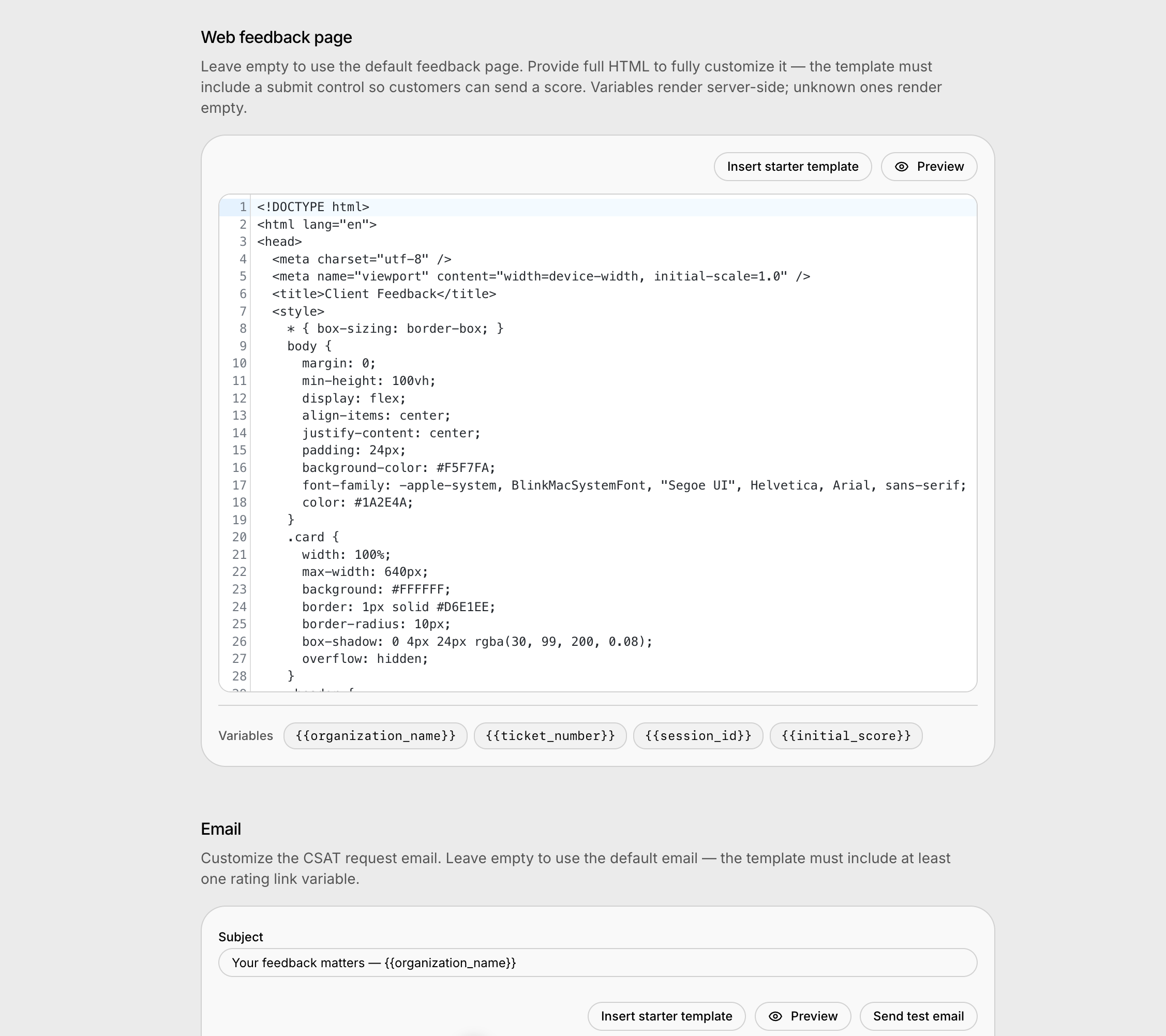 Your CSAT surfaces are now fully yours: bring your own HTML for the feedback page customers land on and for the CSAT request email, edit and preview both from Settings → CSAT, and manage them via the public API or by just asking Companion.
* Custom CSAT feedback page — provide full HTML; simple data-csat-\* attributes wire up score buttons, comments, and thank-you views, with a JS API for custom flows
* Custom CSAT request email and subject line, sent exactly as you wrote them, with per-score rating link variables
* Template editors with live previews (click a score in the email preview to walk the whole email → page flow), starter templates, and test sends
* Companion can read and edit your CSAT templates — ask it to design a survey matching your brand
* Public API endpoints and MCP tools for CSAT settings (csat:read / csat:write)
* New X (Twitter) channel — connect your own X developer app and support customers over DMs
* Hide noisy session and contact attributes from inbox panels with wildcard patterns
* Copy a full session transcript from the inbox in one click
* Pick a default sending inbox so the composer "From" stays put
* New email template slots: {{agent_name}} and opt-in {{quoted_content}}, now copyable chips
* Jump straight to the linked Zendesk ticket from the session side panel
* Twilio Flex: save settings without re-provisioning and sync chosen task attributes onto the contact
* New option to disable the inbox notification sound
* Faster, smoother dashboard first load — themed splash, lighter startup, automatic recovery after deploys
* Email intake hardening: Gmail-misfiled spam is pulled in and expired mailbox connections recover automatically
* "Assumed resolved" sessions now display as Resolved everywhere
* Re-rating a CSAT survey keeps score history visible, attaches follow-up feedback to the latest score, and never wipes a saved comment
* Zendesk no longer creates duplicate tickets when the AI resolves a session, and closes survive conditional required-field cascades
* Workflow internal notes post to Salesforce as unpublished comments, invisible to customers
* Email threading: the invisible reference token is hidden, replies no longer fork new sessions, and Outlook Web quotes strip cleanly
* AI suggestions are never quoted back at the customer in email replies
* Fixed an inbox freeze caused by empty attribute filter values
* Reply attachments from workflows are persisted on the session timeline
* Voice agents stop interrupting callers who dictate numbers slowly
## Block abusive visitors by IP
Settings → Autopilot now has a Blocked IPs list alongside blocked contacts and domains. Block a single address or a whole CIDR range and that visitor can no longer reach your AI assistant — useful when someone keeps creating throwaway contacts, so contact- and domain-blocking never bite.
* Block a single IP (203.0.113.7) or a CIDR range (203.0.113.0/24), IPv4 and IPv6
* Once a session is seen from a blocked address the block applies on every channel
* Write your own message for blocked visitors, or keep the default
* Manage the list from the API and MCP tools alongside blocked contacts and domains
* The real visitor IP is now read from Cloudflare’s CF-Connecting-IP header, which cannot be forged by the client
* Blocked visitors no longer get an "Internal Server Error" in the widget — they now see a short message explaining they cannot contact the company right now
## Enterprise SSO with SAML and OIDC
Sign in through your own identity provider — Okta, Entra, OneLogin, and friends — with DNS-verified domains and just-in-time provisioning that grants new users a least-privilege role.
* Enterprise SSO via SAML or OIDC with just-in-time provisioning, managed from Settings → Security
* Every phone call is now its own record with a dedicated bubble in the session timeline
* CSAT for Zendesk conversations — surveys delivered as a Sunshine link
* Infobip: AI-queue conversations are claimed automatically when the chatbot releases them
* Tag and category search on the public API and MCP list tools
* Workflow editor: one-click auto-layout, hovered-node path highlighting, and cleaner else-branch layout
* OpenCX skips its own CSAT when Zendesk already offered a survey on the ticket
* Companion writes better agent profiles and grounds onboarding test sessions in your knowledge base
* The voice picker now lists only proven voices
* Fixed an inbox crash for users browsing with Google Translate enabled
* Pasting an item title into AI-instructions search now finds it, and pasted text stays readable in dark mode
* Ticket-resolved workflows fire even when closing the external ticket fails
* Public blocklist endpoints attribute blocks to the API token actor instead of failing
## Crawl password-protected websites
The website crawler can now sign in to your protected sites. Add HTTP Basic, bearer token, cookie, or custom-header credentials to a website datasource and every crawl authenticates automatically — credentials are encrypted at rest and never shown again after saving.
* Crawl sites behind HTTP Basic, bearer tokens, cookies, or custom headers
* Credentials are encrypted at rest and never returned by the API or dashboard
* Set, replace, or clear site authentication via the Crawl API and MCP tools
## See how your team adopts Companion
Your CSAT surfaces are now fully yours: bring your own HTML for the feedback page customers land on and for the CSAT request email, edit and preview both from Settings → CSAT, and manage them via the public API or by just asking Companion.
* Custom CSAT feedback page — provide full HTML; simple data-csat-\* attributes wire up score buttons, comments, and thank-you views, with a JS API for custom flows
* Custom CSAT request email and subject line, sent exactly as you wrote them, with per-score rating link variables
* Template editors with live previews (click a score in the email preview to walk the whole email → page flow), starter templates, and test sends
* Companion can read and edit your CSAT templates — ask it to design a survey matching your brand
* Public API endpoints and MCP tools for CSAT settings (csat:read / csat:write)
* New X (Twitter) channel — connect your own X developer app and support customers over DMs
* Hide noisy session and contact attributes from inbox panels with wildcard patterns
* Copy a full session transcript from the inbox in one click
* Pick a default sending inbox so the composer "From" stays put
* New email template slots: {{agent_name}} and opt-in {{quoted_content}}, now copyable chips
* Jump straight to the linked Zendesk ticket from the session side panel
* Twilio Flex: save settings without re-provisioning and sync chosen task attributes onto the contact
* New option to disable the inbox notification sound
* Faster, smoother dashboard first load — themed splash, lighter startup, automatic recovery after deploys
* Email intake hardening: Gmail-misfiled spam is pulled in and expired mailbox connections recover automatically
* "Assumed resolved" sessions now display as Resolved everywhere
* Re-rating a CSAT survey keeps score history visible, attaches follow-up feedback to the latest score, and never wipes a saved comment
* Zendesk no longer creates duplicate tickets when the AI resolves a session, and closes survive conditional required-field cascades
* Workflow internal notes post to Salesforce as unpublished comments, invisible to customers
* Email threading: the invisible reference token is hidden, replies no longer fork new sessions, and Outlook Web quotes strip cleanly
* AI suggestions are never quoted back at the customer in email replies
* Fixed an inbox freeze caused by empty attribute filter values
* Reply attachments from workflows are persisted on the session timeline
* Voice agents stop interrupting callers who dictate numbers slowly
## Block abusive visitors by IP
Settings → Autopilot now has a Blocked IPs list alongside blocked contacts and domains. Block a single address or a whole CIDR range and that visitor can no longer reach your AI assistant — useful when someone keeps creating throwaway contacts, so contact- and domain-blocking never bite.
* Block a single IP (203.0.113.7) or a CIDR range (203.0.113.0/24), IPv4 and IPv6
* Once a session is seen from a blocked address the block applies on every channel
* Write your own message for blocked visitors, or keep the default
* Manage the list from the API and MCP tools alongside blocked contacts and domains
* The real visitor IP is now read from Cloudflare’s CF-Connecting-IP header, which cannot be forged by the client
* Blocked visitors no longer get an "Internal Server Error" in the widget — they now see a short message explaining they cannot contact the company right now
## Enterprise SSO with SAML and OIDC
Sign in through your own identity provider — Okta, Entra, OneLogin, and friends — with DNS-verified domains and just-in-time provisioning that grants new users a least-privilege role.
* Enterprise SSO via SAML or OIDC with just-in-time provisioning, managed from Settings → Security
* Every phone call is now its own record with a dedicated bubble in the session timeline
* CSAT for Zendesk conversations — surveys delivered as a Sunshine link
* Infobip: AI-queue conversations are claimed automatically when the chatbot releases them
* Tag and category search on the public API and MCP list tools
* Workflow editor: one-click auto-layout, hovered-node path highlighting, and cleaner else-branch layout
* OpenCX skips its own CSAT when Zendesk already offered a survey on the ticket
* Companion writes better agent profiles and grounds onboarding test sessions in your knowledge base
* The voice picker now lists only proven voices
* Fixed an inbox crash for users browsing with Google Translate enabled
* Pasting an item title into AI-instructions search now finds it, and pasted text stays readable in dark mode
* Ticket-resolved workflows fire even when closing the external ticket fails
* Public blocklist endpoints attribute blocks to the API token actor instead of failing
## Crawl password-protected websites
The website crawler can now sign in to your protected sites. Add HTTP Basic, bearer token, cookie, or custom-header credentials to a website datasource and every crawl authenticates automatically — credentials are encrypted at rest and never shown again after saving.
* Crawl sites behind HTTP Basic, bearer tokens, cookies, or custom headers
* Credentials are encrypted at rest and never returned by the API or dashboard
* Set, replace, or clear site authentication via the Crawl API and MCP tools
## See how your team adopts Companion
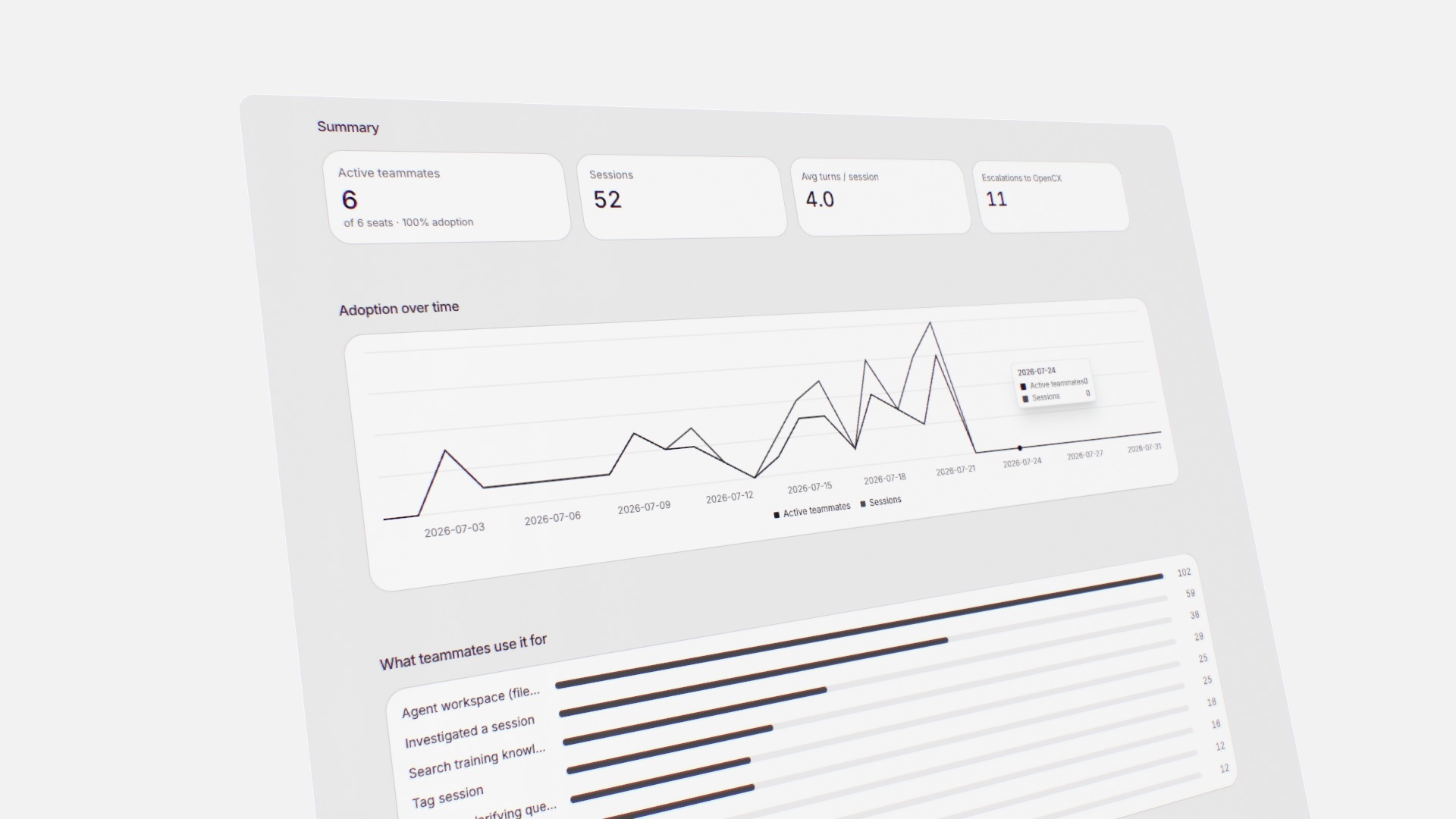 A new Companion Adoption report shows how your team uses the AI copilot — active teammates against seats, sessions and turns, what they use it for, and escalations to the OpenCX team.
* New Companion Adoption report under Reports
* Active teammates vs. seats, sessions, and average turns per session
* A breakdown of what teammates actually use Companion for
* Escalations to the OpenCX team, tracked over time
## Analytics, rebuilt for speed
A new Companion Adoption report shows how your team uses the AI copilot — active teammates against seats, sessions and turns, what they use it for, and escalations to the OpenCX team.
* New Companion Adoption report under Reports
* Active teammates vs. seats, sessions, and average turns per session
* A breakdown of what teammates actually use Companion for
* Escalations to the OpenCX team, tracked over time
## Analytics, rebuilt for speed
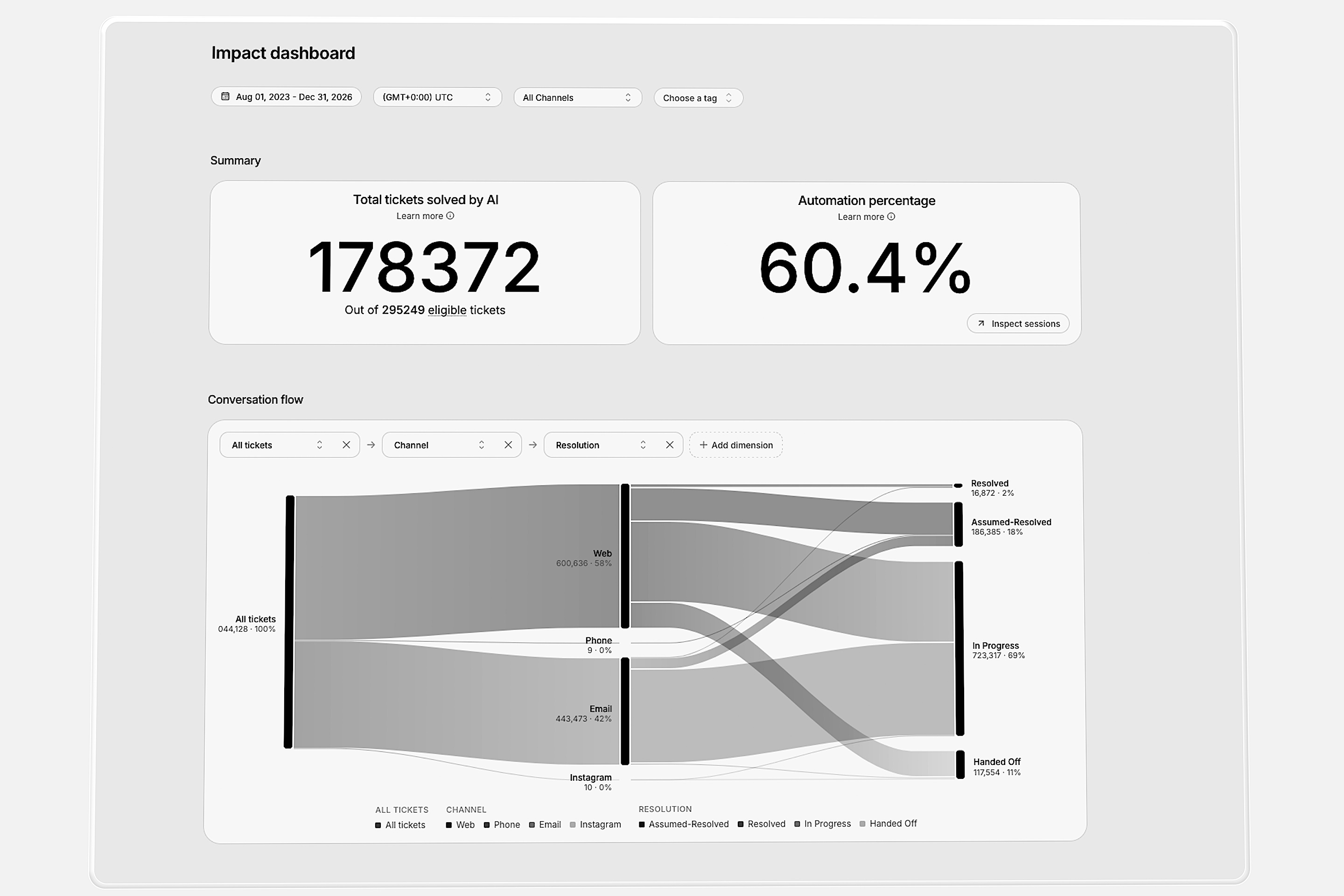 The Impact Dashboard is now much faster. It loads in moments, even with millions of conversations, and Companion’s analytics and the dashboards you build with it got the same speed boost.
* The Impact Dashboard loads in moments, even on the busiest workspaces
* Companion answers your analytics questions faster
* Dashboards you build with Companion stay fast as your data grows
## Introducing Companion Apps
Now you can build your own tools right inside the platform. Describe the dashboard or inbox widget you want, and Companion turns it into a working app in minutes, shaped around how your team works.
### Custom reports for the metrics that matter
The Impact Dashboard is now much faster. It loads in moments, even with millions of conversations, and Companion’s analytics and the dashboards you build with it got the same speed boost.
* The Impact Dashboard loads in moments, even on the busiest workspaces
* Companion answers your analytics questions faster
* Dashboards you build with Companion stay fast as your data grows
## Introducing Companion Apps
Now you can build your own tools right inside the platform. Describe the dashboard or inbox widget you want, and Companion turns it into a working app in minutes, shaped around how your team works.
### Custom reports for the metrics that matter
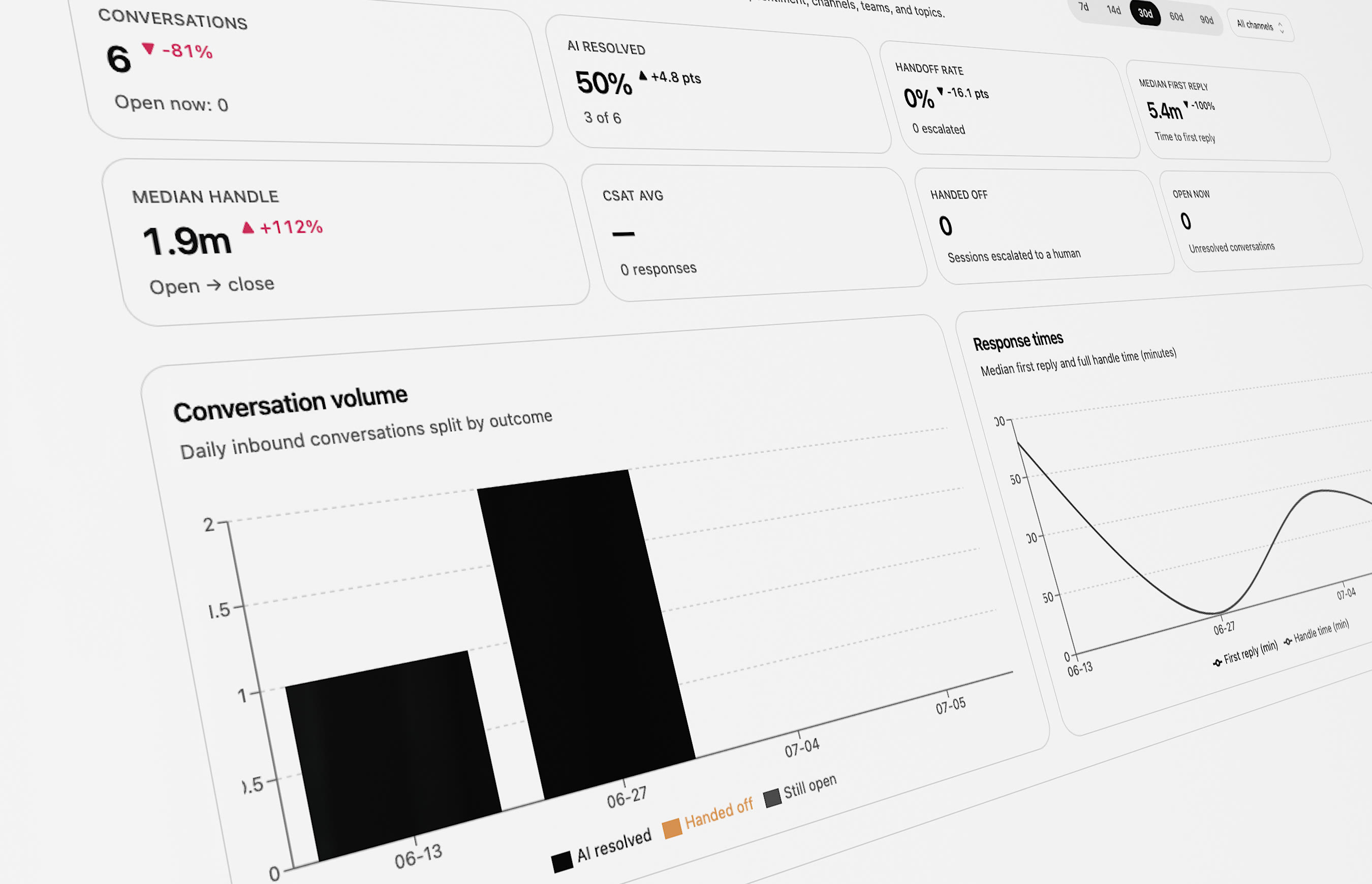 Track resolution, CSAT, SLAs, and cost the way your team measures them. Describe the custom report or dashboard you want, and Companion builds it on your live data — the answers you need, ready in minutes.
* See where conversations resolve, stall, or escalate
* Go from a question to an answer in minutes
### Faster resolutions, without the tab-switching
Track resolution, CSAT, SLAs, and cost the way your team measures them. Describe the custom report or dashboard you want, and Companion builds it on your live data — the answers you need, ready in minutes.
* See where conversations resolve, stall, or escalate
* Go from a question to an answer in minutes
### Faster resolutions, without the tab-switching
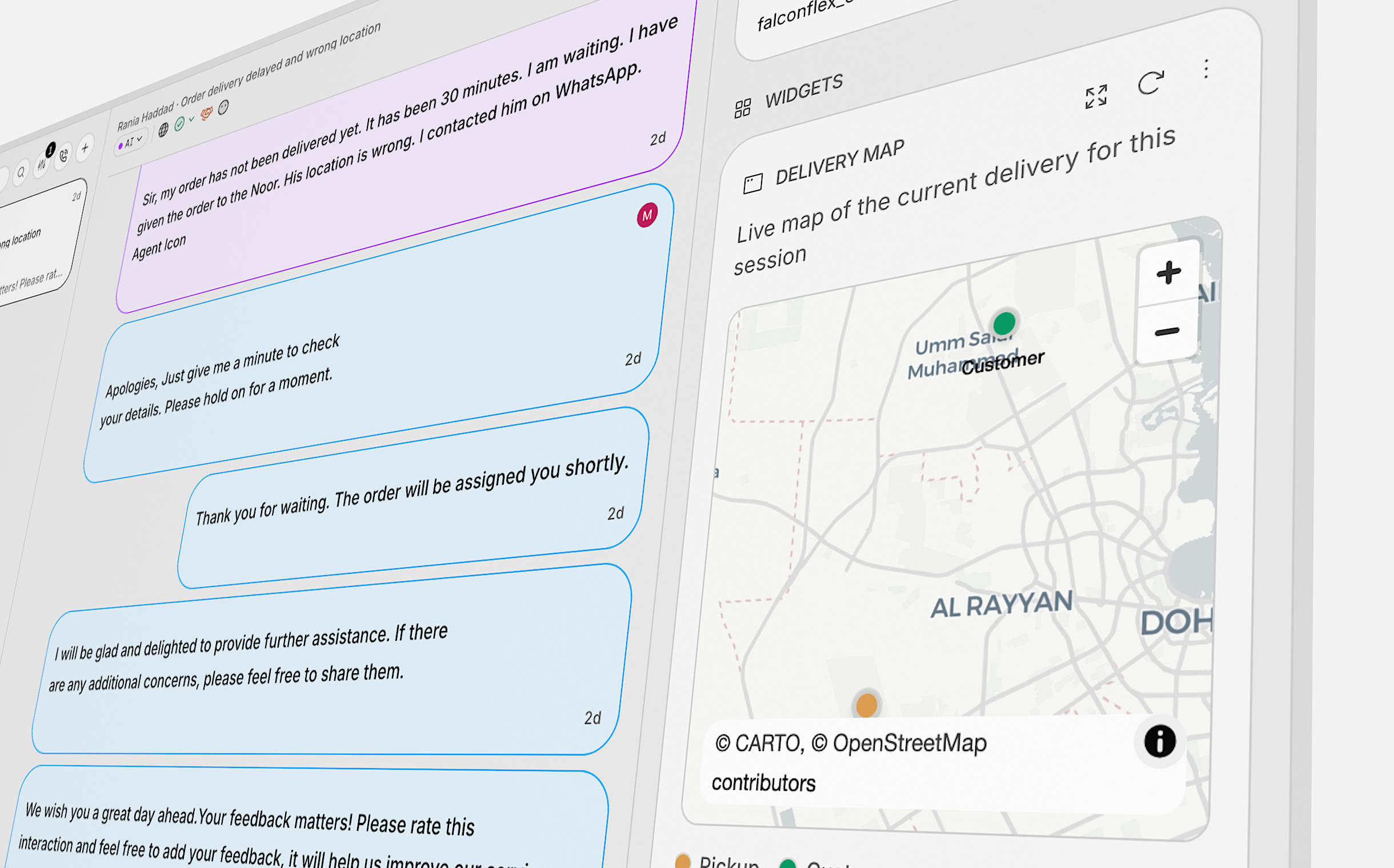 Bring the exact context a conversation needs into the inbox — order status, a live delivery map, account history — so agents answer on the spot instead of digging through other tools.
* Cut handle time with the context already in reach
* Surface live order, delivery, and account details
## Ask Companion any analytics question
Bring the exact context a conversation needs into the inbox — order status, a live delivery map, account history — so agents answer on the spot instead of digging through other tools.
* Cut handle time with the context already in reach
* Surface live order, delivery, and account details
## Ask Companion any analytics question
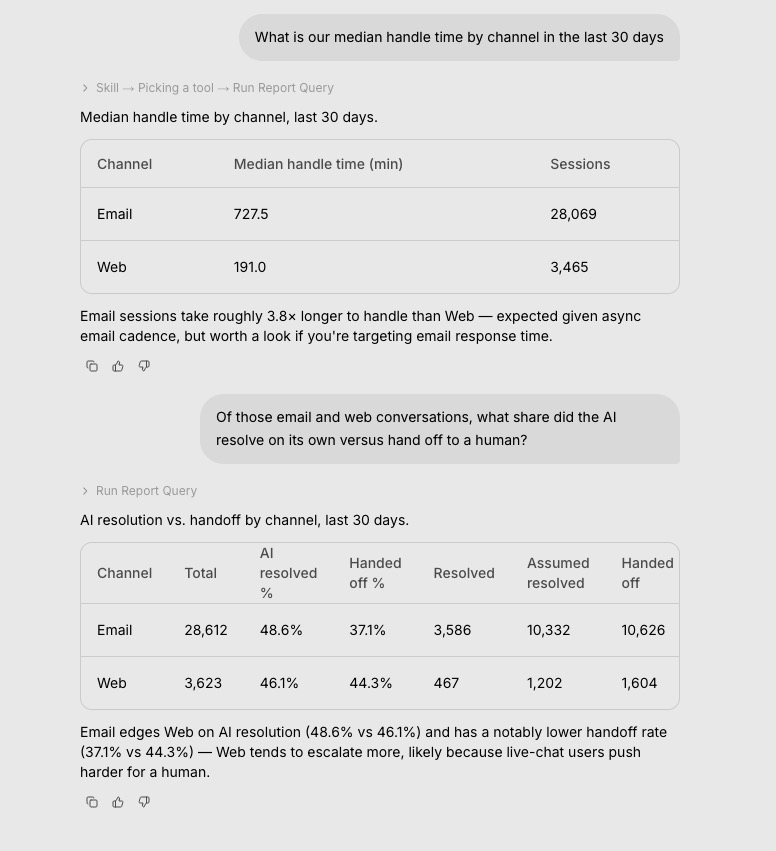 When the built-in reports don’t cover it, Companion now runs the analysis for you — custom breakdowns, percentiles, trends, and cross-cuts over your conversations, CSAT, SLA, agents, and tags. Just ask in plain language.
* Ask Companion the questions the standard reports don’t answer — “median handle time by channel last month”, “CSAT vs queue-wait by channel”, “SLA breach rate by team” — and it computes the answer over your live data
* Covers custom breakdowns, percentiles, correlations, and time-bucketed trends across sessions, messages, CSAT, SLA, agents, contacts, and tags
## Companion can now run your actions
Ask Companion to run one of your actions and it makes the real request for you — with your confirmation — then shows you the response. It can run your workflows too.
* Companion can run a configured action on your behalf — it makes the action’s real HTTP request and returns the response, always asking you to confirm first
* Companion can run your workflows the same way
* Run an action or workflow with a conversation’s in-session context — its org variables, contact identity, and headers — so it behaves exactly as it would for the AI agent
## See which Instructions, Knowledge, and Actions your AI uses
Every AI reply now records the Instructions, Knowledge Base articles, and Actions it drew on. Each one gets a usage view — how often it was available to the AI versus actually used, the handoffs tied to it, and the conversations that used it — and you can filter your inbox by them.
* Every AI Instruction, Knowledge Base article, and Action now has a usage view — Available (the AI had it in context), Used (it actually applied or cited it), and the related Handoffs
* Open the list of conversations that used a given Instruction, Action, or KB article and jump straight into any of them in the inbox
* Filter a resource's usage by date range
* Filter conversations by the Instructions, Actions, or Knowledge Base articles the AI used in them
## Freshdesk ticketing, HubSpot AI fields, and richer session exports
Connect Freshdesk as a ticketing system, let AI fill your configured HubSpot fields, and export sessions with your own custom data columns — with live progress while the export runs.
* Freshdesk ticketing integration — connect Freshdesk and hand conversations off as tickets
* HubSpot AI fields — the AI fills in your chosen HubSpot ticket and contact fields when it hands off or resolves a conversation, and the values show in your inbox
* In HubSpot assist mode, conversations about topics you choose can go straight to the AI for a public reply
* Add your own custom data columns to session exports — for both conversations and contacts
* Your existing custom data keys are suggested as you type when setting up export columns
* Session exports include handoff reason and explanation columns
* Get notified when a session export finishes — the notification takes you straight to it
* Session export filters now match the inbox, with a preview of the file before you export
* Archive policies — archived insights keep tracking new conversations and alert you when an issue comes back
* Approve or reject suggested insight categories in bulk
* AI summaries for phone calls
* Infobip conversations are labeled when the AI hands off or resolves, so your team can spot AI activity at a glance
* Actions can now be enabled for the API channel
* Create a session and its contact in one API call, including custom data on both
* Session custom data is now available on the public session API
* Session exports show live progress with a count and estimated time remaining
* Large session exports are faster and more reliable
* Email replies thread into the right conversation more reliably
* Conversation tags are applied more carefully, following each tag's description
* Voice agents handle interruptions more naturally
* Better dark mode for phone agents
* Fixed cases where the AI replied twice to the same customer message or reopened a resolved conversation
* Pre-handoff workflows run once per handoff, even when messages arrive in quick succession
* Conversations are only assigned to you when you actually start writing a reply
* Conversations with no messages yet now show up in inbox filters, counts, and exports
* Macros keep their line breaks when you reopen them for editing
* Incoming email replies no longer include quoted history from earlier messages
* Closing a conversation in the dashboard now closes the linked Zendesk ticket
* Conversations whose Zendesk ticket was already closed no longer run into errors
* The AI now reads the email subject on Zendesk email tickets
* Conversations closed by a workflow are no longer counted as resolved by the AI
* Fixed duplicate AI replies in Twilio Flex conversations — messages are now processed directly, so customers get a single timely response
* Rapid messages on WhatsApp, Instagram, and Messenger no longer create duplicate contacts or conversations
* Images and files sent over Infobip now arrive in the inbox, and the handoff message reaches the customer before the conversation moves to a human agent
* Tag names with unsupported characters are rejected when created, so a bad tag can no longer stop the AI from replying
* Publishing AI instructions works reliably again
* Reports load reliably and match the dashboard theme
* Editing AI instructions and the AI profile now requires the right permission — others get a read-only view
* Voice agents pronounce spelled-out letters correctly in Spanish, support Arabic dialect voices, and no longer prompt for input mid-transfer
## Excluding a page now removes it from your AI
When you exclude a crawled page — or add an exclude rule to a website source — its content is removed from your knowledge base, so your AI stops answering from pages you meant to hide.
* Excluding a crawled page deletes its content from your AI instead of leaving it citable
* Adding an exclude path now cleans up already-crawled pages that match it
* Re-including a page requeues it for the next crawl to rebuild its content
## Keep insight categories organized — and catch issues when they come back
Up to 150 insight categories with a usage meter. Companion helps merge duplicates. Resolved issues reopen when they happen again, and you can see similar insights at a glance.
* Up to 150 categories with a usage bar and a warning when you are at the limit
* Create, edit, approve, or merge categories from Companion
* Companion can guide you through cleaning up duplicate categories at scale
* Similar insights at the bottom of each insight shows related themes
* Resolved insights reopen automatically when the same issue happens again
* Category settings stay fast with long lists
* Sensible limits on category name and description length
* Insight analysis stays reliable with many categories
* Usage meter shows a loading state while counts update
## Talk about insights with your team
Comment on insights like the inbox — threads, @mentions, notifications, and jump to the right comment from a notification.
* Comment threads on insights with @mentions and reply notifications
* Notifications take you to the exact comment with a brief highlight
* Comments show up right away when you open a discussion
* @mention menu works on all training content
* Reply notifications show the right title on desktop
## Schedule when AI instructions apply
Set start and end dates for AI instructions. Before you publish, see what is scheduled, live, or already past.
* Pick date and time windows when each instruction is active
* Scheduled instructions apply to voice and when copying settings to another workspace
* Draft view groups instructions as scheduled, active, or expired
* Date picker does not fill in an end date until you are ready
* Publishing schedule-only changes does not create stray drafts
## Smarter email and Twilio Flex in the inbox
Control how each email channel handles mail, use reusable templates, and see Twilio Flex agent messages in the inbox.
* Choose how each email channel handles incoming mail
* Email replies land on the right conversation more reliably
* Reusable email templates you can manage and use with Companion
* Twilio Flex agent messages show in the inbox like other agent replies
* Voice agents recognize your product names and jargon more accurately
* See why a conversation was assigned to a particular agent or team
## Start WhatsApp chats from the dashboard, plus new workflow steps
Open a new WhatsApp conversation from the dashboard. Workflows can run in order, assign smarter, and pull data from pages, documents, and spreadsheets.
* Start a new WhatsApp conversation from the dashboard
* Run workflow steps in order when a ticket is created
* Auto-assign can pick the right team, then assign an agent
* New steps: fetch a webpage, parse a document, read spreadsheets
* HubSpot workflows can create more than one ticket per conversation when enabled
* Workflow run history loads faster for workflows with many branches
* Intercom: fewer duplicate or out-of-order replies after handoff
* Front: conversations stay unassigned after AI replies when they should
* WhatsApp: contacts with the same phone number no longer duplicate
* Inbox filters work with numeric custom fields
## Clearer roles and billing in settings
Roles and permissions are easier to manage. Billing connects to Stripe for simpler subscription handling (for admins).
* Redesigned roles and permissions — easier to see who can do what
* Billing tied to Stripe with straightforward subscription management for admins
* Team page shows role names instead of long permission lists
* Billing overview focuses on paying customers by default
* Admins see canceled, paused, and overdue subscriptions when linking billing
* Billing page no longer shows Free plan when a paid subscription exists
## Infobip, WhatsApp surveys, and a better inbox
Infobip as a channel, WhatsApp satisfaction surveys with tap-to-rate lists, filter by external ticket ID, resize the reply box, and send files without a message.
* Infobip Conversations as a support channel
* Customer satisfaction surveys on WhatsApp with tap-to-rate lists
* Filter conversations by external ticket ID
* Resize the reply box; add internal notes anywhere; send attachments without text
* HubSpot can create tickets without contact email or phone when you allow it
* Images in Freshchat show inline for agents and customers
* Zendesk auto-fill works with more field types
* Zendesk custom fields update more reliably
* Auto-tagging considers attachments
* Choose what happens when the AI detects a prohibited topic — per channel
* Azerbaijani and Bengali added as supported languages
* Workflow editor autocomplete works reliably again
* Zendesk conversations no longer look AI-assigned when the AI will not reply
* Long URLs and emails truncate cleanly in the conversation list
## Companion answers faster and shows more as it works
Companion starts quicker, shows rich updates while it works, and lets you keep typing. Look up help on docs.open.cx when you are stuck.
* First message in Companion lands faster
* See structured updates in the chat as Companion works
* Keep typing while Companion is running; progress shows between steps
* Ask Companion to look up answers on docs.open.cx
* Switching chats no longer shows duplicate Companion messages
* Very long opening messages no longer fail to send
* Companion shows its reasoning again, including AI Identity help
## Freshchat routing, shared settings, and macros that run workflows
Shared workspace settings, smarter Freshchat handoffs and tags, macros that start workflows, and more control over assignments.
* One set of workspace settings for the whole team
* Freshchat handoffs can route to a specific group
* Freshchat tags stay in sync with channel and group names
* Workflows can start when an agent sends a macro
* Unassign open conversations; react when agents go available or away
* Pick which Front signature AI replies use
* Set how many AI chats Twilio Flex can handle at once
* Agent-reply webhooks include assignee and custom contact fields
* Message bubbles are easier to read
* The AI sees attachment names and types
* Clearer phone keypad tones during voice calls
* Freshchat handoffs and agent lookup are more reliable
* Front AI replies no longer accidentally archive conversations
* Saving Sunshine settings no longer clears your Zendesk connection
## From blank workspace to live AI — guided by Companion
When the built-in reports don’t cover it, Companion now runs the analysis for you — custom breakdowns, percentiles, trends, and cross-cuts over your conversations, CSAT, SLA, agents, and tags. Just ask in plain language.
* Ask Companion the questions the standard reports don’t answer — “median handle time by channel last month”, “CSAT vs queue-wait by channel”, “SLA breach rate by team” — and it computes the answer over your live data
* Covers custom breakdowns, percentiles, correlations, and time-bucketed trends across sessions, messages, CSAT, SLA, agents, contacts, and tags
## Companion can now run your actions
Ask Companion to run one of your actions and it makes the real request for you — with your confirmation — then shows you the response. It can run your workflows too.
* Companion can run a configured action on your behalf — it makes the action’s real HTTP request and returns the response, always asking you to confirm first
* Companion can run your workflows the same way
* Run an action or workflow with a conversation’s in-session context — its org variables, contact identity, and headers — so it behaves exactly as it would for the AI agent
## See which Instructions, Knowledge, and Actions your AI uses
Every AI reply now records the Instructions, Knowledge Base articles, and Actions it drew on. Each one gets a usage view — how often it was available to the AI versus actually used, the handoffs tied to it, and the conversations that used it — and you can filter your inbox by them.
* Every AI Instruction, Knowledge Base article, and Action now has a usage view — Available (the AI had it in context), Used (it actually applied or cited it), and the related Handoffs
* Open the list of conversations that used a given Instruction, Action, or KB article and jump straight into any of them in the inbox
* Filter a resource's usage by date range
* Filter conversations by the Instructions, Actions, or Knowledge Base articles the AI used in them
## Freshdesk ticketing, HubSpot AI fields, and richer session exports
Connect Freshdesk as a ticketing system, let AI fill your configured HubSpot fields, and export sessions with your own custom data columns — with live progress while the export runs.
* Freshdesk ticketing integration — connect Freshdesk and hand conversations off as tickets
* HubSpot AI fields — the AI fills in your chosen HubSpot ticket and contact fields when it hands off or resolves a conversation, and the values show in your inbox
* In HubSpot assist mode, conversations about topics you choose can go straight to the AI for a public reply
* Add your own custom data columns to session exports — for both conversations and contacts
* Your existing custom data keys are suggested as you type when setting up export columns
* Session exports include handoff reason and explanation columns
* Get notified when a session export finishes — the notification takes you straight to it
* Session export filters now match the inbox, with a preview of the file before you export
* Archive policies — archived insights keep tracking new conversations and alert you when an issue comes back
* Approve or reject suggested insight categories in bulk
* AI summaries for phone calls
* Infobip conversations are labeled when the AI hands off or resolves, so your team can spot AI activity at a glance
* Actions can now be enabled for the API channel
* Create a session and its contact in one API call, including custom data on both
* Session custom data is now available on the public session API
* Session exports show live progress with a count and estimated time remaining
* Large session exports are faster and more reliable
* Email replies thread into the right conversation more reliably
* Conversation tags are applied more carefully, following each tag's description
* Voice agents handle interruptions more naturally
* Better dark mode for phone agents
* Fixed cases where the AI replied twice to the same customer message or reopened a resolved conversation
* Pre-handoff workflows run once per handoff, even when messages arrive in quick succession
* Conversations are only assigned to you when you actually start writing a reply
* Conversations with no messages yet now show up in inbox filters, counts, and exports
* Macros keep their line breaks when you reopen them for editing
* Incoming email replies no longer include quoted history from earlier messages
* Closing a conversation in the dashboard now closes the linked Zendesk ticket
* Conversations whose Zendesk ticket was already closed no longer run into errors
* The AI now reads the email subject on Zendesk email tickets
* Conversations closed by a workflow are no longer counted as resolved by the AI
* Fixed duplicate AI replies in Twilio Flex conversations — messages are now processed directly, so customers get a single timely response
* Rapid messages on WhatsApp, Instagram, and Messenger no longer create duplicate contacts or conversations
* Images and files sent over Infobip now arrive in the inbox, and the handoff message reaches the customer before the conversation moves to a human agent
* Tag names with unsupported characters are rejected when created, so a bad tag can no longer stop the AI from replying
* Publishing AI instructions works reliably again
* Reports load reliably and match the dashboard theme
* Editing AI instructions and the AI profile now requires the right permission — others get a read-only view
* Voice agents pronounce spelled-out letters correctly in Spanish, support Arabic dialect voices, and no longer prompt for input mid-transfer
## Excluding a page now removes it from your AI
When you exclude a crawled page — or add an exclude rule to a website source — its content is removed from your knowledge base, so your AI stops answering from pages you meant to hide.
* Excluding a crawled page deletes its content from your AI instead of leaving it citable
* Adding an exclude path now cleans up already-crawled pages that match it
* Re-including a page requeues it for the next crawl to rebuild its content
## Keep insight categories organized — and catch issues when they come back
Up to 150 insight categories with a usage meter. Companion helps merge duplicates. Resolved issues reopen when they happen again, and you can see similar insights at a glance.
* Up to 150 categories with a usage bar and a warning when you are at the limit
* Create, edit, approve, or merge categories from Companion
* Companion can guide you through cleaning up duplicate categories at scale
* Similar insights at the bottom of each insight shows related themes
* Resolved insights reopen automatically when the same issue happens again
* Category settings stay fast with long lists
* Sensible limits on category name and description length
* Insight analysis stays reliable with many categories
* Usage meter shows a loading state while counts update
## Talk about insights with your team
Comment on insights like the inbox — threads, @mentions, notifications, and jump to the right comment from a notification.
* Comment threads on insights with @mentions and reply notifications
* Notifications take you to the exact comment with a brief highlight
* Comments show up right away when you open a discussion
* @mention menu works on all training content
* Reply notifications show the right title on desktop
## Schedule when AI instructions apply
Set start and end dates for AI instructions. Before you publish, see what is scheduled, live, or already past.
* Pick date and time windows when each instruction is active
* Scheduled instructions apply to voice and when copying settings to another workspace
* Draft view groups instructions as scheduled, active, or expired
* Date picker does not fill in an end date until you are ready
* Publishing schedule-only changes does not create stray drafts
## Smarter email and Twilio Flex in the inbox
Control how each email channel handles mail, use reusable templates, and see Twilio Flex agent messages in the inbox.
* Choose how each email channel handles incoming mail
* Email replies land on the right conversation more reliably
* Reusable email templates you can manage and use with Companion
* Twilio Flex agent messages show in the inbox like other agent replies
* Voice agents recognize your product names and jargon more accurately
* See why a conversation was assigned to a particular agent or team
## Start WhatsApp chats from the dashboard, plus new workflow steps
Open a new WhatsApp conversation from the dashboard. Workflows can run in order, assign smarter, and pull data from pages, documents, and spreadsheets.
* Start a new WhatsApp conversation from the dashboard
* Run workflow steps in order when a ticket is created
* Auto-assign can pick the right team, then assign an agent
* New steps: fetch a webpage, parse a document, read spreadsheets
* HubSpot workflows can create more than one ticket per conversation when enabled
* Workflow run history loads faster for workflows with many branches
* Intercom: fewer duplicate or out-of-order replies after handoff
* Front: conversations stay unassigned after AI replies when they should
* WhatsApp: contacts with the same phone number no longer duplicate
* Inbox filters work with numeric custom fields
## Clearer roles and billing in settings
Roles and permissions are easier to manage. Billing connects to Stripe for simpler subscription handling (for admins).
* Redesigned roles and permissions — easier to see who can do what
* Billing tied to Stripe with straightforward subscription management for admins
* Team page shows role names instead of long permission lists
* Billing overview focuses on paying customers by default
* Admins see canceled, paused, and overdue subscriptions when linking billing
* Billing page no longer shows Free plan when a paid subscription exists
## Infobip, WhatsApp surveys, and a better inbox
Infobip as a channel, WhatsApp satisfaction surveys with tap-to-rate lists, filter by external ticket ID, resize the reply box, and send files without a message.
* Infobip Conversations as a support channel
* Customer satisfaction surveys on WhatsApp with tap-to-rate lists
* Filter conversations by external ticket ID
* Resize the reply box; add internal notes anywhere; send attachments without text
* HubSpot can create tickets without contact email or phone when you allow it
* Images in Freshchat show inline for agents and customers
* Zendesk auto-fill works with more field types
* Zendesk custom fields update more reliably
* Auto-tagging considers attachments
* Choose what happens when the AI detects a prohibited topic — per channel
* Azerbaijani and Bengali added as supported languages
* Workflow editor autocomplete works reliably again
* Zendesk conversations no longer look AI-assigned when the AI will not reply
* Long URLs and emails truncate cleanly in the conversation list
## Companion answers faster and shows more as it works
Companion starts quicker, shows rich updates while it works, and lets you keep typing. Look up help on docs.open.cx when you are stuck.
* First message in Companion lands faster
* See structured updates in the chat as Companion works
* Keep typing while Companion is running; progress shows between steps
* Ask Companion to look up answers on docs.open.cx
* Switching chats no longer shows duplicate Companion messages
* Very long opening messages no longer fail to send
* Companion shows its reasoning again, including AI Identity help
## Freshchat routing, shared settings, and macros that run workflows
Shared workspace settings, smarter Freshchat handoffs and tags, macros that start workflows, and more control over assignments.
* One set of workspace settings for the whole team
* Freshchat handoffs can route to a specific group
* Freshchat tags stay in sync with channel and group names
* Workflows can start when an agent sends a macro
* Unassign open conversations; react when agents go available or away
* Pick which Front signature AI replies use
* Set how many AI chats Twilio Flex can handle at once
* Agent-reply webhooks include assignee and custom contact fields
* Message bubbles are easier to read
* The AI sees attachment names and types
* Clearer phone keypad tones during voice calls
* Freshchat handoffs and agent lookup are more reliable
* Front AI replies no longer accidentally archive conversations
* Saving Sunshine settings no longer clears your Zendesk connection
## From blank workspace to live AI — guided by Companion
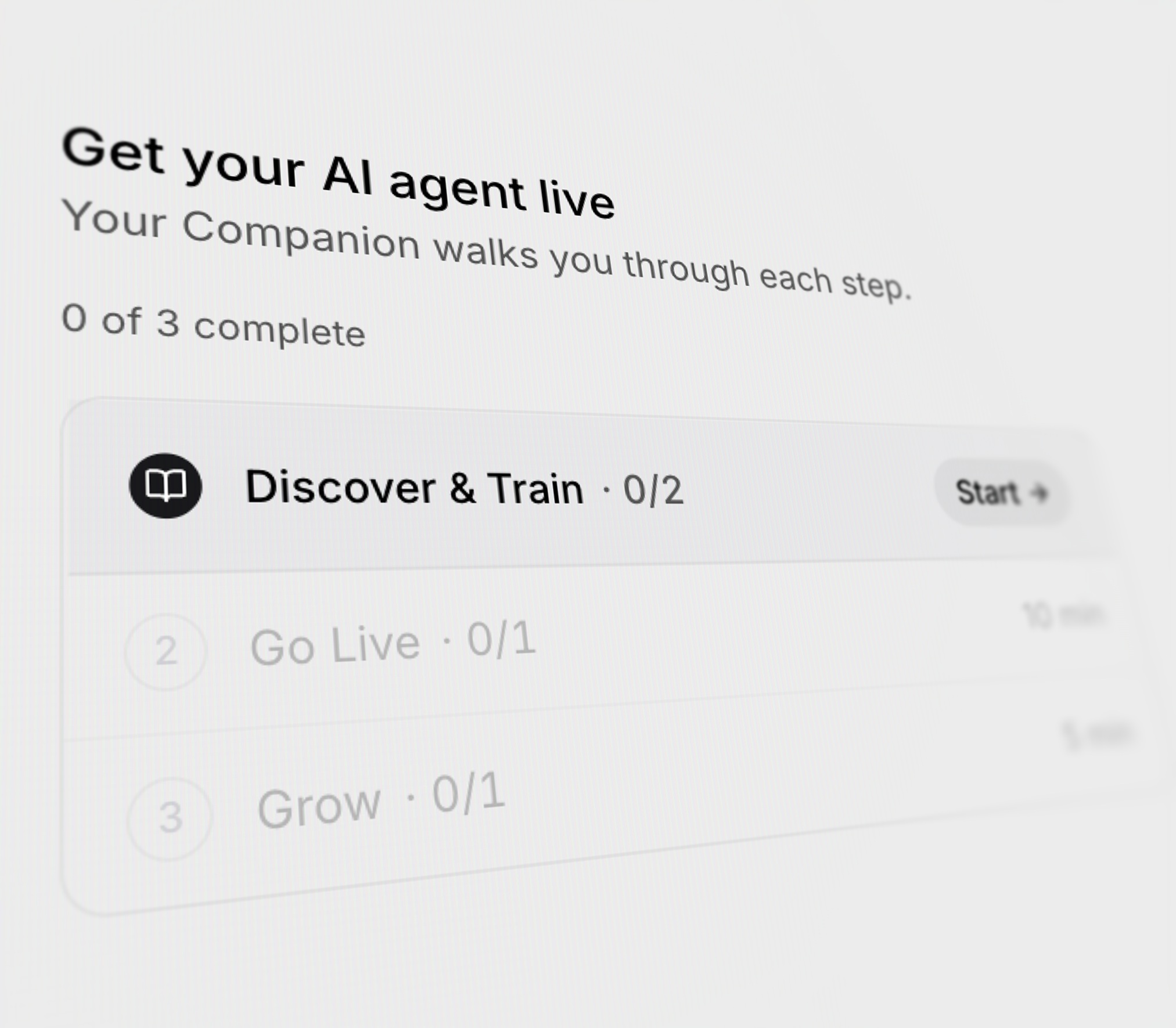 Three new flows in Companion: a guided onboarding path, plan-first execution, and live test sessions. Setup to shipped, all in one chat.
### Plan first, then act
Three new flows in Companion: a guided onboarding path, plan-first execution, and live test sessions. Setup to shipped, all in one chat.
### Plan first, then act
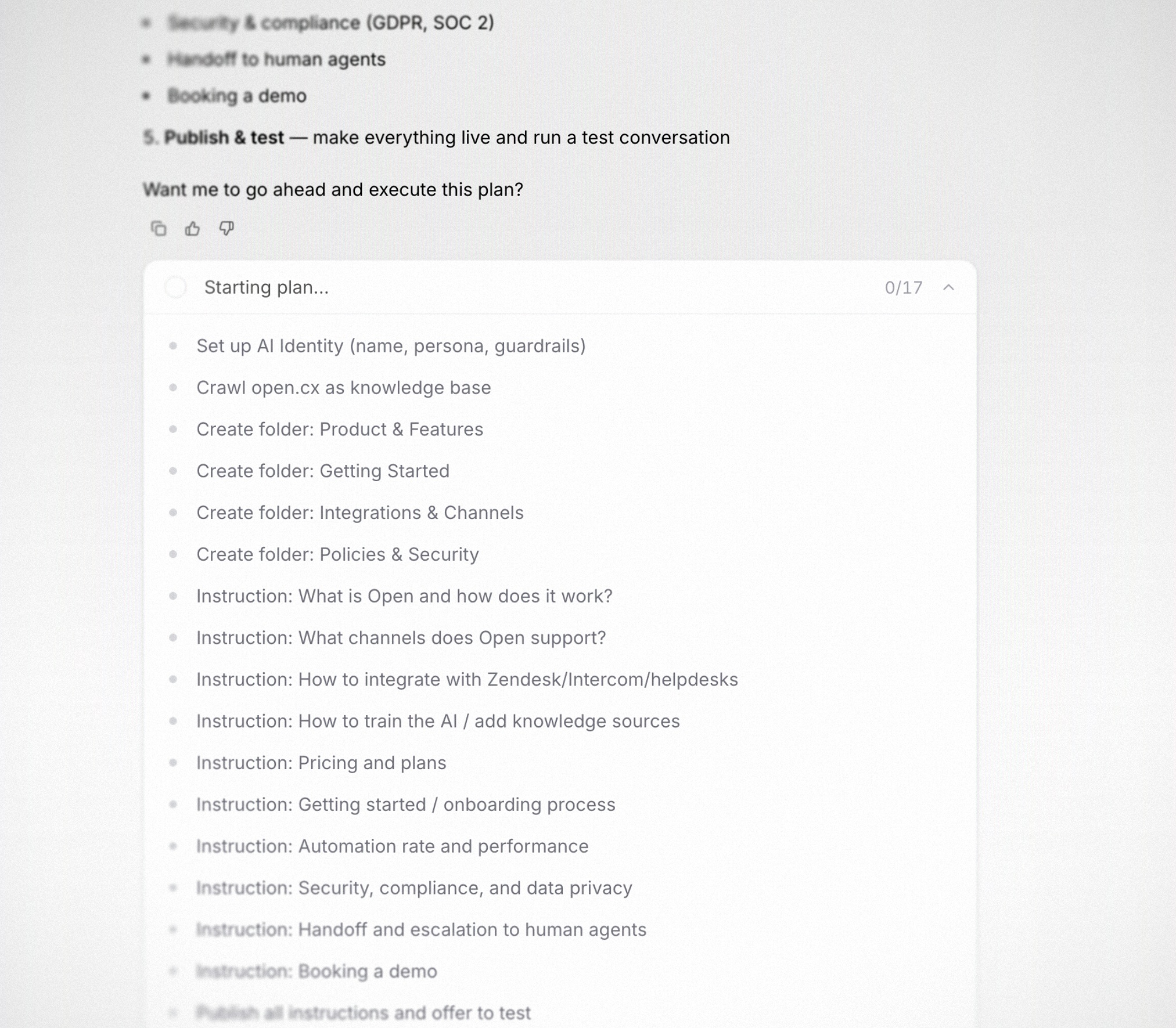 Every multi-step ask gets a fully itemized plan up-front. Approve, edit, or stop — Companion never moves on its own.
* Itemized plan up-front for every substantial ask
* Live progress counter ticks as steps execute
* Stop or redirect at any step
### Test before you ship
Every multi-step ask gets a fully itemized plan up-front. Approve, edit, or stop — Companion never moves on its own.
* Itemized plan up-front for every substantial ask
* Live progress counter ticks as steps execute
* Stop or redirect at any step
### Test before you ship
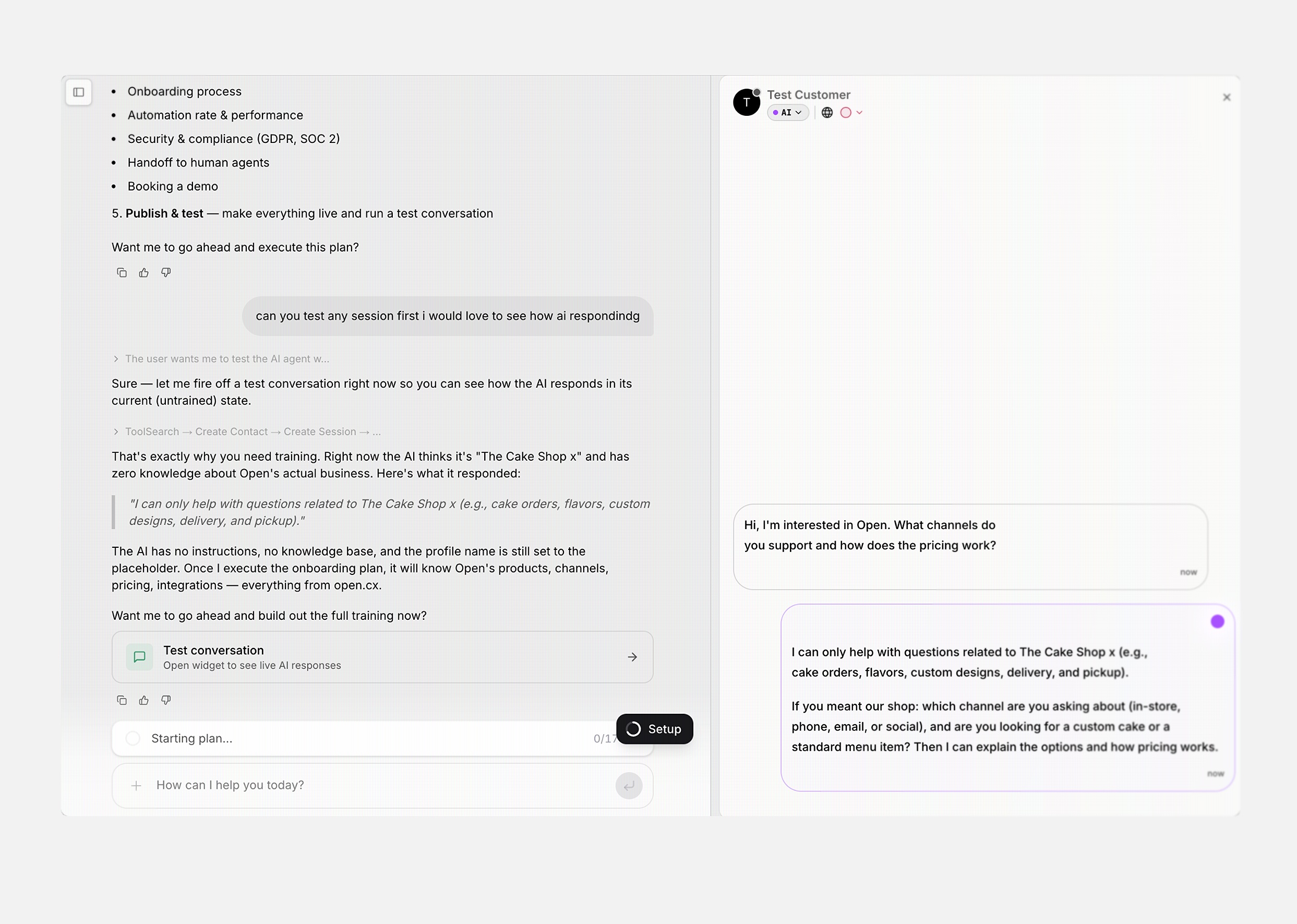 Spin up a real customer-side widget next to the chat. See exactly how the AI responds, then train where it falls short.
* Real widget, real AI — same tools, same responses
* Side-by-side: Companion on the left, Test Customer on the right
* Companion reads the transcript and recommends concrete fixes
- Three-step path — Discover & Train, Go Live, Grow — driven by Companion
- Progress derives from your real workspace state, not checkboxes
- One panel everywhere — chat, empty inbox, landing page
## Group your inbox by channel, assignee, status, language, or team
Add a Group By to any inbox view and the session list collapses into labelled sections — grouping by channel, assignee, status, AI status, language, or support team. Saved on the view, so the grouping comes back the next time you open it.
* New Group By control in the filter menu — pick from channel, assignee, status, AI status, language, or support team
* Group selection is part of the view, so it persists across reloads and across teammates with access to the view
* Group headers are compact and tighten the spacing between groups so you see more sessions at a glance
* Inbox loads more sessions per group when a Group By is active, so you don't see truncated buckets
## Saved replies now support variables
Drop variables (macros) into a saved reply and they fill in from the session at send time — contact name, ticket number, agent name, and more. Edit existing replies and add variables from the same place you create them.
* Insert variables when authoring a saved reply; they resolve against the active session at send time
* Saved replies editor refreshed — fixes overflow on long replies and drops slow-loading empty states
## Personalize how the inbox sends messages — per channel
A new Personalization settings page lets each agent pick how they send messages on each channel. Choose Enter or Cmd+Enter as the send shortcut per channel, and the active shortcut shows up right on the send button.
* New Personalization settings group — per-channel send shortcut preference (Enter or Cmd+Enter)
* The send button shows the active shortcut inline, so you always see how the next message will be sent
* Settings sidebar regrouped — Notifications now lives under a new Personalization section
* Cleaner shortcut dropdowns: monospace kbd labels, tighter spacing, no redundant separators
## Inbox shows messages in the agent's language by default
Translated messages are now what the agent sees by default — and what the customer sees by default for outbound replies — so you don't need to click into each message to reveal the translation. A "Show original message" action is one click away on every message.
* Bubble renders the translated message by default; one click reveals the original
* URL previews now match the displayed (translated) text, so the link chips line up with the bubble
* Outbound agent replies in the inbox now show the original (workspace-language) version, not the translated one shipped to the customer
## Inbox messages send instantly
Agent replies now render the moment you hit send — no more waiting for the round trip. The optimistic message is reconciled with the server in the background and dedupes cleanly when the real message arrives.
* Agent messages render optimistically and reconcile against the server response — no flicker, no duplicates, no avatar swap
* Outbound socket payload carries a client-generated UUID for clean dedup
## Custom views: drag to reorder, filter by current user
Drag custom views in the view selector to reorder them — order persists per-org. And every view that filters by assignee can now use a dynamic Current User token, so one shared "My open tickets" view works for the whole team.
* Drag and drop custom views in the view picker (via a dedicated Reorder dialog) — order is saved per-org
* New Current User option in the assignee filter — saves a single view that means "assigned to me" for whoever opens it
* Team management modal and tab state now sync to the URL — bookmark `/settings/groups?team=&tab=members` and land back on the same screen
## Per-channel control over agent assignment on handoff
Each channel now has its own assign-on-handoff toggle. Hand off in WhatsApp without auto-assigning to an agent while keeping auto-assignment on for email — or vice versa.
* New per-channel `assign_on_handoff` setting in the rollout strategy modal
* Handoff service respects the per-channel toggle before auto-assigning
* Handoff settings now respect the Web channel config for API and Web Voice channels (instead of silently coupling to a different bucket)
## Faster, more accurate voice transcription
The voice agent pipeline switches to Deepgram Flux for Western languages and Nova 3 for Arabic — a notable accuracy bump on alphanumerics and account-number reads, with lower latency than the previous OpenAI realtime path.
* Deepgram Flux for Western languages, Nova 3 for Arabic — better alphanumeric accuracy and lower latency
* Flux now runs through LiveKit Inference for unified routing and direct Deepgram fallback
## New workflow building blocks
Five new pieces of workflow plumbing land together: a Contact Message Received trigger, a Reopen Ticket action that walks the official status path, an Apply Custom Status action, a Release Session From Capacity action that frees up an agent slot until the customer replies, and an Inactive Trigger improvement that ignores the workflow's own outbound messages.
* New Contact Message Received trigger — fires on every inbound contact message with the ticket and message text
* New Reopen Ticket action — reopens a closed session through the official status path so SLA, system rows, and inactivity timers are correctly inserted
* New Apply Custom Status action — set a sub-status without changing the main status
* New Release Session From Capacity action — temporarily frees an agent's capacity slot until the customer replies again
* Get Ticket Agent action returns nullable fields when there is no assignee, so it no longer throws inside no-assignee branches
* New `callFinishedBy` field on the Call Finished trigger payload, so workflows can branch on who ended the call
* Workflow editor auto-fills canonical action inputs (e.g. ticket number) from the trigger payload at drop time
* Save validation now reports every missing required action input — Fix-to-jump on each error
* Action node cards humanize their inputs with one row per field — long values truncate instead of blowing up the card
* Custom Status / Apply / Release / Reopen actions now clear `sub_status_id` on every status change for consistency
* Customer-inactive trigger no longer schedules itself off its own workflow message inserts (no more infinite loops)
* Customer-inactive trigger no longer arms on AI replies — only on real agent messages and inbound contact messages
## Export your AI knowledge base as CSV
Export your AI Instructions tree as CSV — full export from the section header, or scoped per-folder from any folder's hover menu. Filename includes the folder slug, and a confirm dialog previews the file before download.
* New Export as CSV action on AI Instructions — full or per-folder, with a preview dialog showing filename, count, and column badges
* Per-folder export filenames slug the folder name (`ai-instructions-{slug}-YYYY-MM-DD.csv`) so multi-folder dumps don't collide
## Smarter, fairer agent distribution
Agent routing now factors in released-from-capacity sessions as a tiebreaker — agents with fewer paused conversations get the next ticket when capacity is otherwise tied. When agents are completely tied, distribution randomizes instead of always picking the first one.
* Released-from-capacity sessions are excluded from team and global capacity counts until the customer replies again
* Tiebreaker order: most remaining capacity → fewest released sessions → random pick when fully tied
* Agent availability picker now searches by `name` (matches the backend DTO) and returns up to 250 agents
## FreshChat: AI replies on assignment, lifecycle events, and webhook fixes
The FreshChat integration now mirrors Intercom — the AI starts replying as soon as a conversation is assigned to it, and lifecycle events (resolution, reopen, assignment) flow through correctly with the right system messages and SLA bookkeeping.
* AI starts replying on `conversation_assignment` to our agent, replaying any pre-assignment messages
* Conversation resolution renders as a system event in the timeline (matches the Front integration convention)
* Conversation reopen flips the OpenCX session back to OPEN, inserts the AGENT\_REOPENED\_SESSION row, and resumes SLA + inactivity timers — across every matching session, not just the first
* Webhook URL is now copyable from the FreshChat settings page
* Workflow Close Ticket action now routes through FreshChatService.closeConversation when a `freshchat_conversation_id` is present, instead of failing with `UNEXPECTED_ERROR`
* Self-close webhook echo no longer writes a duplicate "Conversation was closed in FreshChat" lifecycle event
* Webhook action names match the FreshChat docs (`conversation_assignment`, `conversation_resolution`, `conversation_reopen`)
* Transport errors from `getAgentByEmail` now propagate so FreshChat retries — they no longer silently drop assignment events
## Describe your tags so the AI auto-tagger picks the right one
Add a short description to each tag and the AI auto-tagger uses it as taxonomy guidance — picking the right tag when the name alone is ambiguous.
* Add an optional one-sentence description when creating or editing a tag
* Available everywhere you manage tags: the dashboard, the public API, and the @opencx/mcp tools
* Tag management page redesigned: rounded pills, hover the tag to see its description, and a confirmation step before deleting
## Contact segments in the public API, MCP, and workflows
Read your contact segments and check membership from anywhere — the public API, the @opencx/mcp tools, or a new workflow action that branches on whether a contact is in a given segment.
* New public-API endpoints: list segments, get a segment, list every segment a contact is in, and check membership for a (segment, contact) pair — all gated by the contacts:read scope
* New @opencx/mcp tools wrapping those endpoints: list\_contact\_segments, get\_contact\_segment, list\_segments\_for\_contact, and check\_contact\_in\_segment — available in v1.11.0
* New "Check Contact In Segment" workflow action with a lazy segment picker; returns isMember so you can branch downstream with an if step
## Trigger workflows when human agents go quiet
Spin up a real customer-side widget next to the chat. See exactly how the AI responds, then train where it falls short.
* Real widget, real AI — same tools, same responses
* Side-by-side: Companion on the left, Test Customer on the right
* Companion reads the transcript and recommends concrete fixes
- Three-step path — Discover & Train, Go Live, Grow — driven by Companion
- Progress derives from your real workspace state, not checkboxes
- One panel everywhere — chat, empty inbox, landing page
## Group your inbox by channel, assignee, status, language, or team
Add a Group By to any inbox view and the session list collapses into labelled sections — grouping by channel, assignee, status, AI status, language, or support team. Saved on the view, so the grouping comes back the next time you open it.
* New Group By control in the filter menu — pick from channel, assignee, status, AI status, language, or support team
* Group selection is part of the view, so it persists across reloads and across teammates with access to the view
* Group headers are compact and tighten the spacing between groups so you see more sessions at a glance
* Inbox loads more sessions per group when a Group By is active, so you don't see truncated buckets
## Saved replies now support variables
Drop variables (macros) into a saved reply and they fill in from the session at send time — contact name, ticket number, agent name, and more. Edit existing replies and add variables from the same place you create them.
* Insert variables when authoring a saved reply; they resolve against the active session at send time
* Saved replies editor refreshed — fixes overflow on long replies and drops slow-loading empty states
## Personalize how the inbox sends messages — per channel
A new Personalization settings page lets each agent pick how they send messages on each channel. Choose Enter or Cmd+Enter as the send shortcut per channel, and the active shortcut shows up right on the send button.
* New Personalization settings group — per-channel send shortcut preference (Enter or Cmd+Enter)
* The send button shows the active shortcut inline, so you always see how the next message will be sent
* Settings sidebar regrouped — Notifications now lives under a new Personalization section
* Cleaner shortcut dropdowns: monospace kbd labels, tighter spacing, no redundant separators
## Inbox shows messages in the agent's language by default
Translated messages are now what the agent sees by default — and what the customer sees by default for outbound replies — so you don't need to click into each message to reveal the translation. A "Show original message" action is one click away on every message.
* Bubble renders the translated message by default; one click reveals the original
* URL previews now match the displayed (translated) text, so the link chips line up with the bubble
* Outbound agent replies in the inbox now show the original (workspace-language) version, not the translated one shipped to the customer
## Inbox messages send instantly
Agent replies now render the moment you hit send — no more waiting for the round trip. The optimistic message is reconciled with the server in the background and dedupes cleanly when the real message arrives.
* Agent messages render optimistically and reconcile against the server response — no flicker, no duplicates, no avatar swap
* Outbound socket payload carries a client-generated UUID for clean dedup
## Custom views: drag to reorder, filter by current user
Drag custom views in the view selector to reorder them — order persists per-org. And every view that filters by assignee can now use a dynamic Current User token, so one shared "My open tickets" view works for the whole team.
* Drag and drop custom views in the view picker (via a dedicated Reorder dialog) — order is saved per-org
* New Current User option in the assignee filter — saves a single view that means "assigned to me" for whoever opens it
* Team management modal and tab state now sync to the URL — bookmark `/settings/groups?team=&tab=members` and land back on the same screen
## Per-channel control over agent assignment on handoff
Each channel now has its own assign-on-handoff toggle. Hand off in WhatsApp without auto-assigning to an agent while keeping auto-assignment on for email — or vice versa.
* New per-channel `assign_on_handoff` setting in the rollout strategy modal
* Handoff service respects the per-channel toggle before auto-assigning
* Handoff settings now respect the Web channel config for API and Web Voice channels (instead of silently coupling to a different bucket)
## Faster, more accurate voice transcription
The voice agent pipeline switches to Deepgram Flux for Western languages and Nova 3 for Arabic — a notable accuracy bump on alphanumerics and account-number reads, with lower latency than the previous OpenAI realtime path.
* Deepgram Flux for Western languages, Nova 3 for Arabic — better alphanumeric accuracy and lower latency
* Flux now runs through LiveKit Inference for unified routing and direct Deepgram fallback
## New workflow building blocks
Five new pieces of workflow plumbing land together: a Contact Message Received trigger, a Reopen Ticket action that walks the official status path, an Apply Custom Status action, a Release Session From Capacity action that frees up an agent slot until the customer replies, and an Inactive Trigger improvement that ignores the workflow's own outbound messages.
* New Contact Message Received trigger — fires on every inbound contact message with the ticket and message text
* New Reopen Ticket action — reopens a closed session through the official status path so SLA, system rows, and inactivity timers are correctly inserted
* New Apply Custom Status action — set a sub-status without changing the main status
* New Release Session From Capacity action — temporarily frees an agent's capacity slot until the customer replies again
* Get Ticket Agent action returns nullable fields when there is no assignee, so it no longer throws inside no-assignee branches
* New `callFinishedBy` field on the Call Finished trigger payload, so workflows can branch on who ended the call
* Workflow editor auto-fills canonical action inputs (e.g. ticket number) from the trigger payload at drop time
* Save validation now reports every missing required action input — Fix-to-jump on each error
* Action node cards humanize their inputs with one row per field — long values truncate instead of blowing up the card
* Custom Status / Apply / Release / Reopen actions now clear `sub_status_id` on every status change for consistency
* Customer-inactive trigger no longer schedules itself off its own workflow message inserts (no more infinite loops)
* Customer-inactive trigger no longer arms on AI replies — only on real agent messages and inbound contact messages
## Export your AI knowledge base as CSV
Export your AI Instructions tree as CSV — full export from the section header, or scoped per-folder from any folder's hover menu. Filename includes the folder slug, and a confirm dialog previews the file before download.
* New Export as CSV action on AI Instructions — full or per-folder, with a preview dialog showing filename, count, and column badges
* Per-folder export filenames slug the folder name (`ai-instructions-{slug}-YYYY-MM-DD.csv`) so multi-folder dumps don't collide
## Smarter, fairer agent distribution
Agent routing now factors in released-from-capacity sessions as a tiebreaker — agents with fewer paused conversations get the next ticket when capacity is otherwise tied. When agents are completely tied, distribution randomizes instead of always picking the first one.
* Released-from-capacity sessions are excluded from team and global capacity counts until the customer replies again
* Tiebreaker order: most remaining capacity → fewest released sessions → random pick when fully tied
* Agent availability picker now searches by `name` (matches the backend DTO) and returns up to 250 agents
## FreshChat: AI replies on assignment, lifecycle events, and webhook fixes
The FreshChat integration now mirrors Intercom — the AI starts replying as soon as a conversation is assigned to it, and lifecycle events (resolution, reopen, assignment) flow through correctly with the right system messages and SLA bookkeeping.
* AI starts replying on `conversation_assignment` to our agent, replaying any pre-assignment messages
* Conversation resolution renders as a system event in the timeline (matches the Front integration convention)
* Conversation reopen flips the OpenCX session back to OPEN, inserts the AGENT\_REOPENED\_SESSION row, and resumes SLA + inactivity timers — across every matching session, not just the first
* Webhook URL is now copyable from the FreshChat settings page
* Workflow Close Ticket action now routes through FreshChatService.closeConversation when a `freshchat_conversation_id` is present, instead of failing with `UNEXPECTED_ERROR`
* Self-close webhook echo no longer writes a duplicate "Conversation was closed in FreshChat" lifecycle event
* Webhook action names match the FreshChat docs (`conversation_assignment`, `conversation_resolution`, `conversation_reopen`)
* Transport errors from `getAgentByEmail` now propagate so FreshChat retries — they no longer silently drop assignment events
## Describe your tags so the AI auto-tagger picks the right one
Add a short description to each tag and the AI auto-tagger uses it as taxonomy guidance — picking the right tag when the name alone is ambiguous.
* Add an optional one-sentence description when creating or editing a tag
* Available everywhere you manage tags: the dashboard, the public API, and the @opencx/mcp tools
* Tag management page redesigned: rounded pills, hover the tag to see its description, and a confirmation step before deleting
## Contact segments in the public API, MCP, and workflows
Read your contact segments and check membership from anywhere — the public API, the @opencx/mcp tools, or a new workflow action that branches on whether a contact is in a given segment.
* New public-API endpoints: list segments, get a segment, list every segment a contact is in, and check membership for a (segment, contact) pair — all gated by the contacts:read scope
* New @opencx/mcp tools wrapping those endpoints: list\_contact\_segments, get\_contact\_segment, list\_segments\_for\_contact, and check\_contact\_in\_segment — available in v1.11.0
* New "Check Contact In Segment" workflow action with a lazy segment picker; returns isMember so you can branch downstream with an if step
## Trigger workflows when human agents go quiet
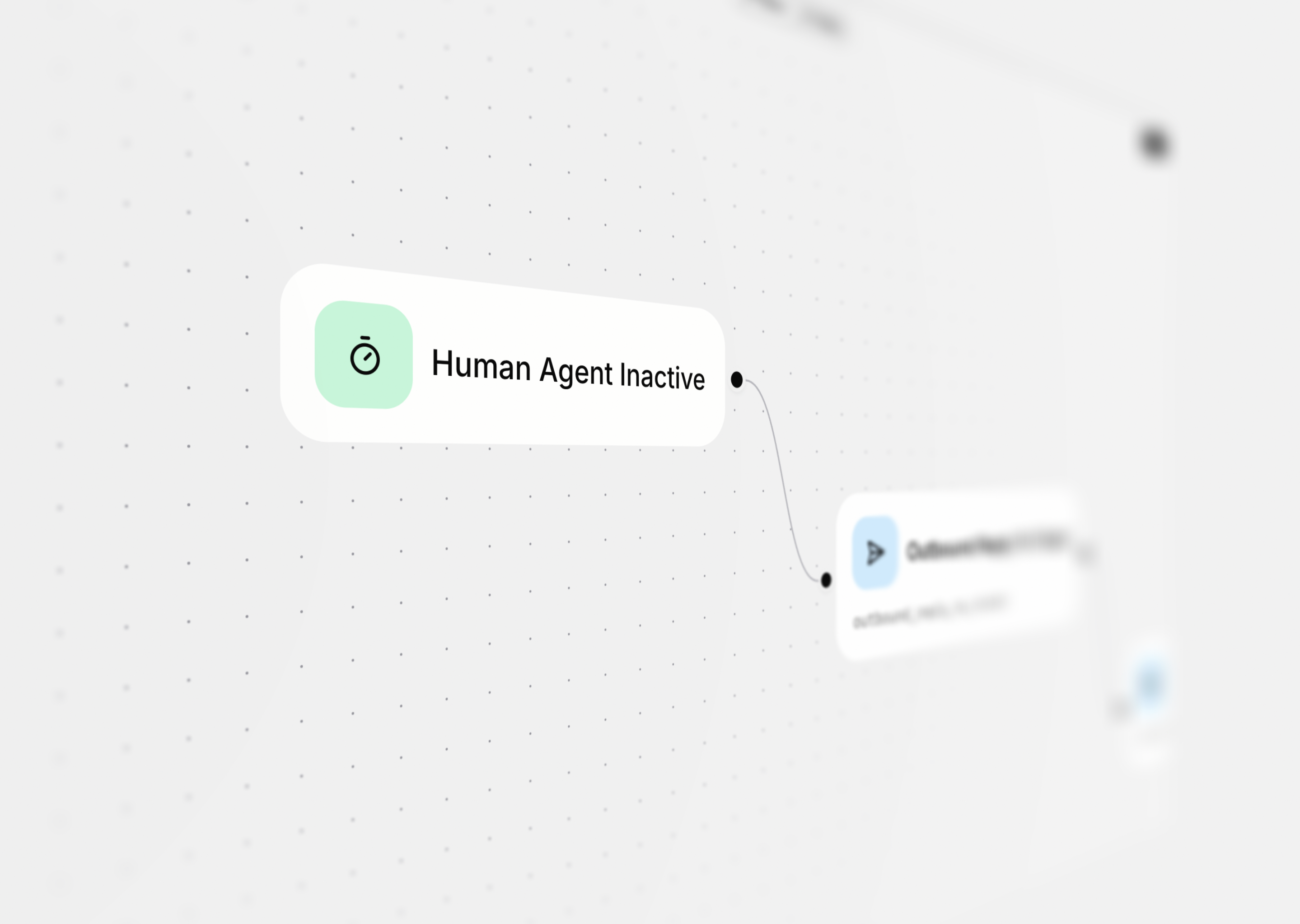 A new workflow trigger fires when a human agent hasn't acted on a ticket for a chosen window — minutes, hours, or days. Wire it to any action to auto-reply with a check-in, hand the conversation back to AI, change ticket status, or escalate to a teammate.
* New "Human Agent Inactive" trigger fires when an assigned human agent hasn't replied for a configurable window
* Pick the inactivity window in minutes, hours, or days — defaults to 20 minutes
* Wire it to any action — automated outbound reply, change ticket status, hand back to AI, notify a teammate
## Custom email template per address
A new workflow trigger fires when a human agent hasn't acted on a ticket for a chosen window — minutes, hours, or days. Wire it to any action to auto-reply with a check-in, hand the conversation back to AI, change ticket status, or escalate to a teammate.
* New "Human Agent Inactive" trigger fires when an assigned human agent hasn't replied for a configurable window
* Pick the inactivity window in minutes, hours, or days — defaults to 20 minutes
* Wire it to any action — automated outbound reply, change ticket status, hand back to AI, notify a teammate
## Custom email template per address
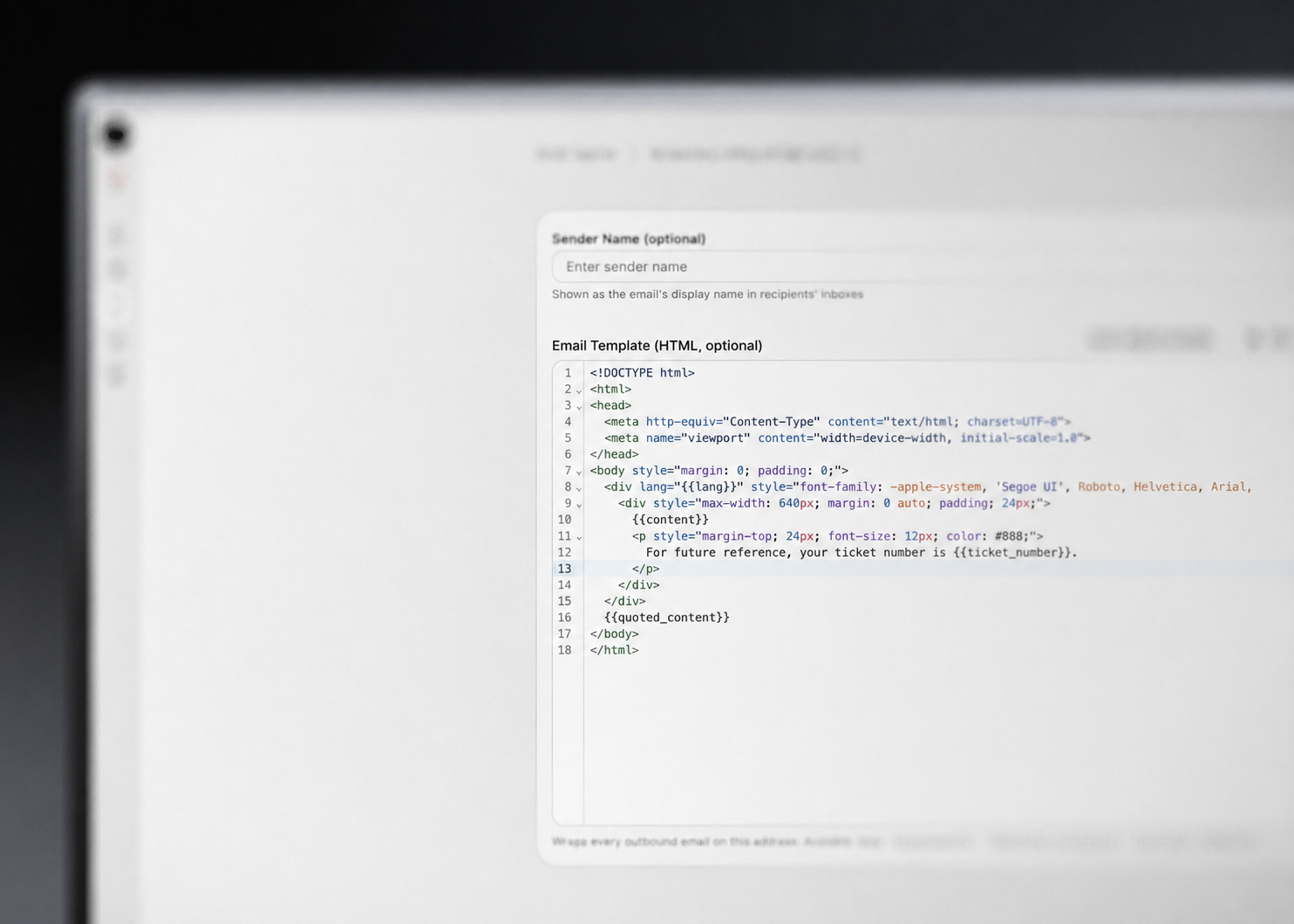 Each connected email address now has its own HTML template. Wrap outbound replies in your own branded chrome — header, footer, ticket number, and quoted thread — using a small set of placeholders, configured independently per address.
* Set a custom HTML template per email address from a new dedicated configuration page
* Slot in the message body, prior thread, ticket number, and locale with `{{content}}`, `{{quoted_content}}`, `{{ticket_number}}`, and `{{lang}}` placeholders
* Validation catches a missing `{{content}}` placeholder before the template saves
* Falls back to a clean default template when none is set — existing addresses keep working untouched
## Share custom views with your team
Each connected email address now has its own HTML template. Wrap outbound replies in your own branded chrome — header, footer, ticket number, and quoted thread — using a small set of placeholders, configured independently per address.
* Set a custom HTML template per email address from a new dedicated configuration page
* Slot in the message body, prior thread, ticket number, and locale with `{{content}}`, `{{quoted_content}}`, `{{ticket_number}}`, and `{{lang}}` placeholders
* Validation catches a missing `{{content}}` placeholder before the template saves
* Falls back to a clean default template when none is set — existing addresses keep working untouched
## Share custom views with your team
 Custom views now have permissions. Pick who can see a view — specific users, specific teams, or everyone in the org — and pick who can edit or delete it. Tweaking filters on a saved view keeps the view selected with an "(Unsaved changes)" indicator, so you never lose your place.
* Share a view with specific users, specific teams, or the whole org
* Restrict editing and deleting to specific users or teams — the creator can always edit
* New Save, Save as, and Create actions in the view picker, with a confirmation dialog before overwriting a shared view
* Edit a view's filters, sorting, and permissions from one dialog
* Changing filters on a saved view now keeps the view selected and shows "(Unsaved changes)" instead of dropping you onto a temporary view
* Unsaved filter edits survive a page reload
* Edit and delete buttons on views you don't own are disabled with a tooltip explaining why
* Adding someone as an editor automatically adds them as a viewer
## Build advanced session filters
Custom views now have permissions. Pick who can see a view — specific users, specific teams, or everyone in the org — and pick who can edit or delete it. Tweaking filters on a saved view keeps the view selected with an "(Unsaved changes)" indicator, so you never lose your place.
* Share a view with specific users, specific teams, or the whole org
* Restrict editing and deleting to specific users or teams — the creator can always edit
* New Save, Save as, and Create actions in the view picker, with a confirmation dialog before overwriting a shared view
* Edit a view's filters, sorting, and permissions from one dialog
* Changing filters on a saved view now keeps the view selected and shows "(Unsaved changes)" instead of dropping you onto a temporary view
* Unsaved filter edits survive a page reload
* Edit and delete buttons on views you don't own are disabled with a tooltip explaining why
* Adding someone as an editor automatically adds them as a viewer
## Build advanced session filters
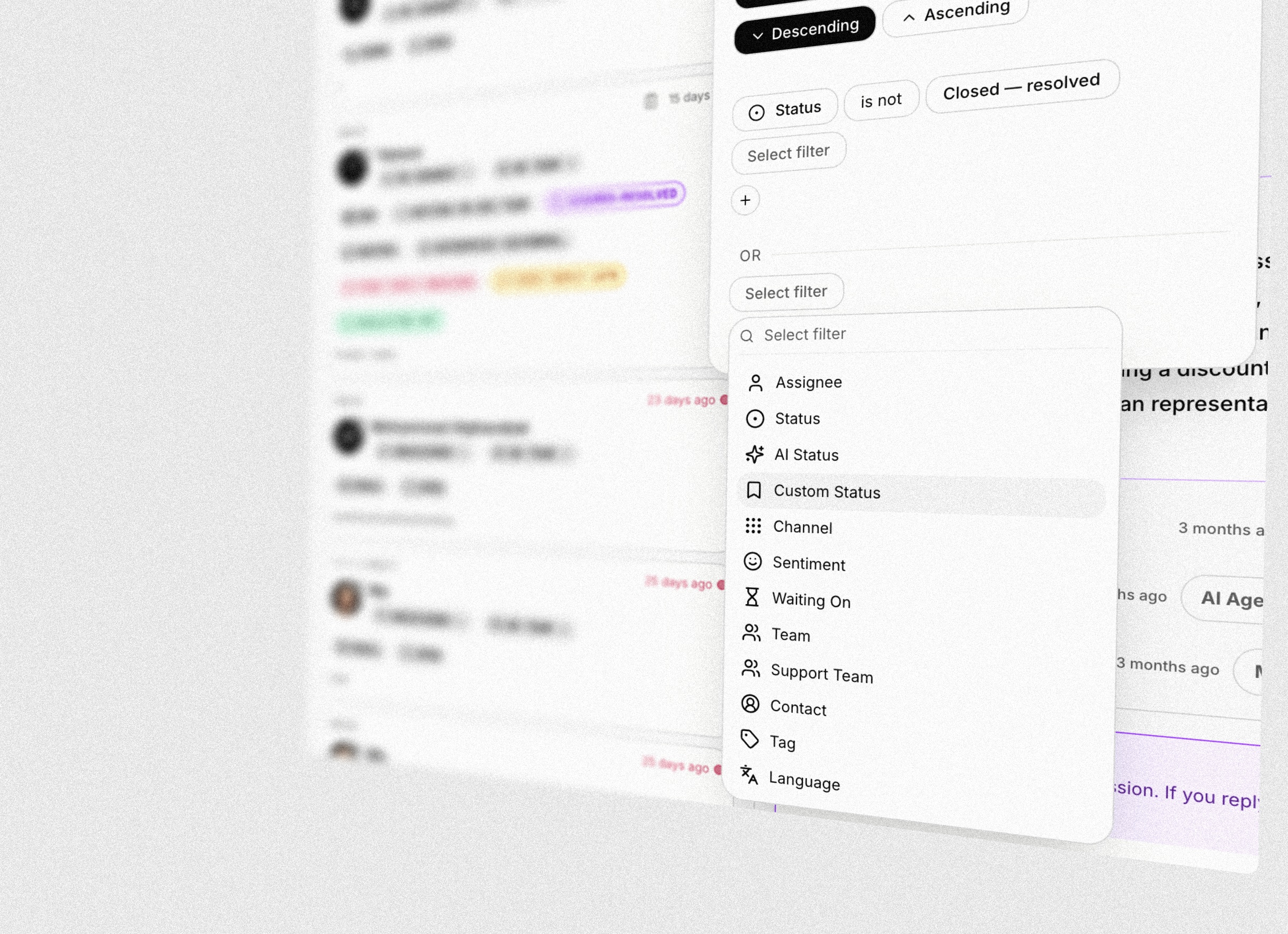 A new filter builder for the inbox — combine any number of conditions with AND/OR groups to slice your sessions exactly how you want. Save the result as a custom view and come back to it with one click.
* Build filters by stacking clauses — pick a field, an operator, and a value
* Group clauses with AND/OR to express complex queries that used to require a custom view
* Filter on channel, assignee, contact, custom data, created date, AI status, tags, and more from one unified menu
* Save any filter as a custom view and reuse it across the team
## Try the widget before you install it
A new filter builder for the inbox — combine any number of conditions with AND/OR groups to slice your sessions exactly how you want. Save the result as a custom view and come back to it with one click.
* Build filters by stacking clauses — pick a field, an operator, and a value
* Group clauses with AND/OR to express complex queries that used to require a custom view
* Filter on channel, assignee, contact, custom data, created date, AI status, tags, and more from one unified menu
* Save any filter as a custom view and reuse it across the team
## Try the widget before you install it
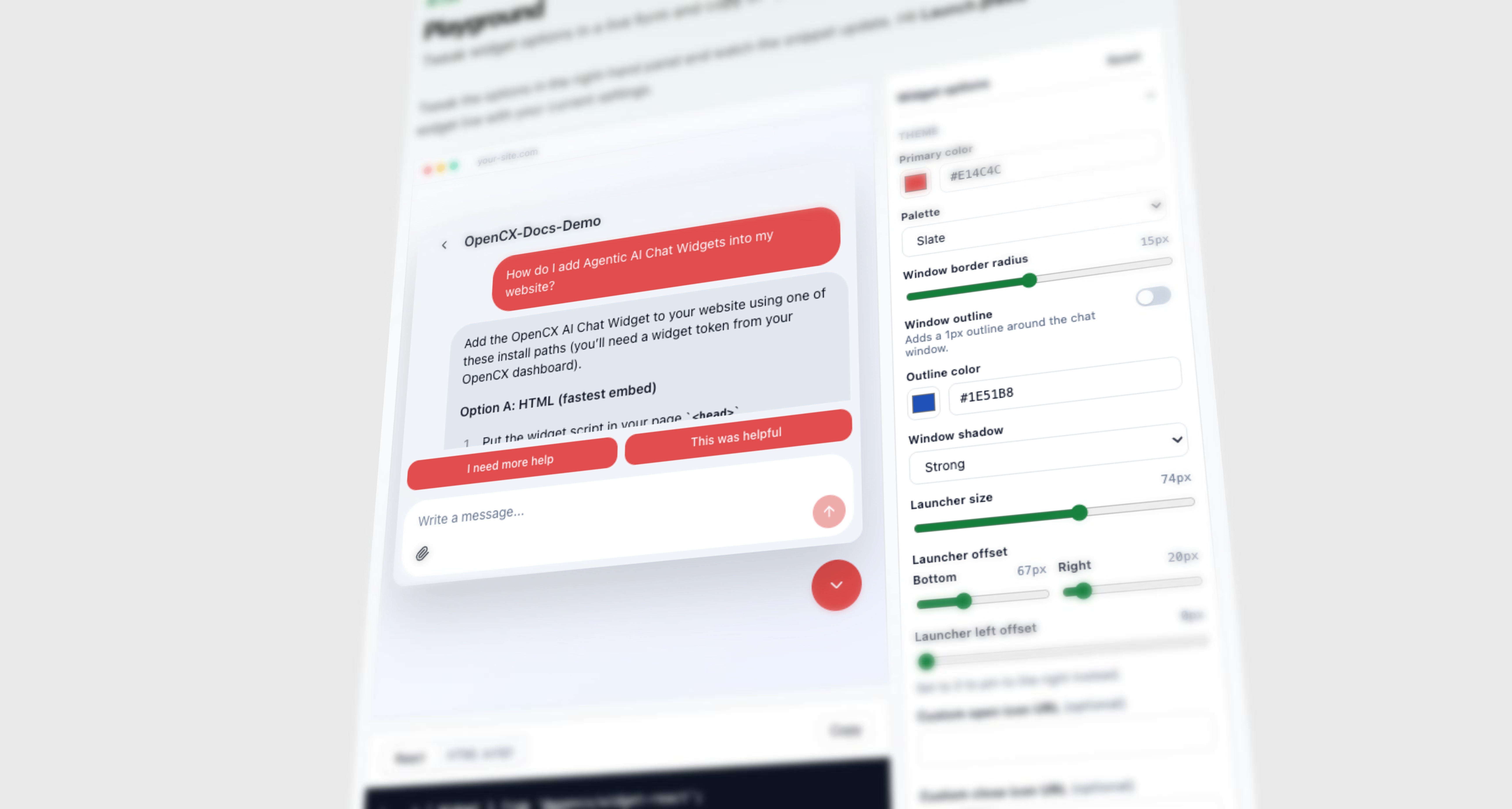 A new interactive Playground in the docs lets you tune every widget option in a live form and copy a ready-to-paste React or HTML snippet. No install, no dashboard — tweak, preview, copy.
* Tweak theme, launcher size/offset, first-visit messages, and more in a live form — the widget updates instantly
* Swap between a React component snippet and an HTML `
A new interactive Playground in the docs lets you tune every widget option in a live form and copy a ready-to-paste React or HTML snippet. No install, no dashboard — tweak, preview, copy.
* Tweak theme, launcher size/offset, first-visit messages, and more in a live form — the widget updates instantly
* Swap between a React component snippet and an HTML `